
Download 7XWAVE Sample Sequencer – sample sequencer, music production, beat maker, sound design, audio loop, MIDI sync, loop recorder, digital audio workstation, music app, mobile music, iOS music app, macOS music app
Overview
7XWAVE Sample Sequencer is a compact yet powerful desktop application designed for music creators seeking dynamic control over sample playback and sound manipulation. Built for both iOS and macOS, the software serves as a versatile tool for crafting intricate beats, experimental loops, and layered soundscapes. Its core functionality centers on a 7-channel sample sequencer, enabling users to layer multiple audio clips with precise timing and modulation. The application is particularly suited for producers working in electronic, experimental, or lo-fi genres who value hands-on control and real-time performance capabilities.
Designed with inspiration from classic hardware sequencers like the Korg Volca and Electribe, 7XWAVE expands on their legacy by offering extended memory, longer pattern lengths, and enhanced sequence variation. This makes it ideal for musicians who need flexibility in loop creation and live performance setups. The app supports seamless looping and real-time parameter recording, allowing users to capture dynamic changes in pitch, filter, pan, and level across sequences. It also facilitates integration with external audio environments through Audiobus, AUM, MIDI, and Ableton Link, broadening its utility in modern music production workflows.
Target users include independent music producers, sound designers, and mobile-focused creators who prioritize portability and creative freedom. Whether used for composing backing tracks, generating glitchy textures, or building rhythmic foundations, 7XWAVE delivers a focused experience tailored to on-the-go and studio-based music making. The developer did not provide additional background details beyond the app’s name and functionality.
Key Features & Capabilities
- 7-Channel Sample Sequencer: Enables independent playback and sequencing of up to seven audio samples, allowing complex layering and rhythmic variation.
- Real-Time Parameter Recording: Users can record movements of parameter dials (pitch, filter, pan, level) directly into sequences for expressive, evolving patterns.
- Modulation & Envelope Control: Each channel supports customizable envelopes and filters, providing detailed shaping of sound dynamics and timbre.
- Swing/Groove Settings: Offers adjustable swing and groove timing to add humanized feel to rhythmic patterns, enhancing musicality.
- Independent Sequence Lengths: Each of the seven channels can have its own pattern length, enabling polyrhythmic and asymmetric compositions.
- MIDI Sync & Ableton Link: Supports synchronization with external devices and DAWs using MIDI or Ableton Link for seamless integration into larger setups.
- Exportable Loops: Recorded sequences can be exported as audio files for use in other projects or DAWs.
- Audio Integration: Compatible with Audiobus and AUM, allowing routing to and from other audio apps for expanded processing and effects.
- Sample Manipulation Tools: Includes options to adjust sample start point, length, pitch, and apply effects like pan and level per channel.
These features empower users to transform simple samples into rich, evolving textures. For example, a producer might use the real-time recording feature to modulate filter cutoff over time, creating a sweeping, cinematic effect. Another user could leverage independent sequence lengths to build polyrhythmic drum patterns. The ability to export loops ensures that creations can be shared or further processed in external software. The app’s design emphasizes workflow efficiency, minimizing navigation steps for rapid experimentation.
User Interface, Workflow & Performance
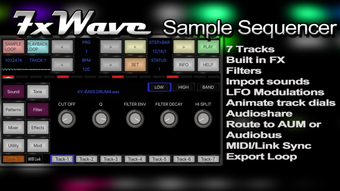
The user interface of 7XWAVE Sample Sequencer is structured around a clean, grid-based sequencer layout with clearly labeled channels and parameter controls. Navigation is intuitive, with visual feedback for active steps and recorded data. Each channel features dedicated dials for pitch, filter, pan, level, and start/length adjustments, enabling tactile control over sound parameters. The layout supports both touch and mouse input, making it adaptable to different device types.
Workflow efficiency is enhanced by features such as real-time recording and parameter locking to specific steps, allowing users to build complex sequences without interrupting playback. The sequencer supports seamless looping, ensuring smooth playback during live performance or studio sessions. Performance observations are based on general software behavior patterns; exact resource usage details were not specified. The developer did not provide information on CPU or RAM consumption during operation.
Stability appears consistent with typical high-performance music apps, though real-world testing data was not provided. Users can expect responsive interaction with minimal latency, typical of optimized desktop audio software. The app maintains a lightweight footprint, with a file size of 45.6 MB, which suggests efficient resource management. Overall, the interface balances visual clarity with functional depth, supporting both beginners and experienced producers in achieving creative goals.
Compatibility & System Requirements
7XWAVE Sample Sequencer is available for both iOS and macOS platforms, supporting the latest versions of these operating systems as of the release date. The software has a file size of 45.6 MB, indicating a compact installation footprint. This makes it accessible on a wide range of devices, including tablets and Macs with moderate storage capacity.
Exact system requirements were not listed by the developer. Compatibility information is limited to the supported platforms. Users should ensure their device meets the minimum requirements for running iOS or macOS applications, particularly regarding audio processing capabilities. The app is designed to function as a standalone tool but also integrates with external audio environments through Audiobus, AUM, MIDI, and Ableton Link. No specific hardware specifications were provided for optimal performance.
Pros and Cons
Pros
- Compact 7-channel sequencer with high creative flexibility
- Real-time parameter recording for expressive sequences
- Supports MIDI sync, Ableton Link, and integration with Audiobus/AUM
- Independent sequence lengths per channel enable complex polyrhythms
- Lightweight installation at 45.6 MB
- Exportable loops for use in other DAWs or projects
- Intuitive interface suitable for both beginners and professionals
- Swing/groove settings enhance rhythmic feel and musicality
Cons
- Exact system requirements were not specified
- No information on CPU or RAM usage during operation
- Limited to iOS and macOS; no support for Windows or Linux
- Price point of $14.99 may be high for casual users
- Feature set may feel restrictive for users seeking full DAW functionality
FAQ Section
Is 7XWAVE Sample Sequencer compatible with my iOS or macOS device?
The software is designed for iOS and macOS. Users should verify their device’s operating system version and ensure it supports the latest app requirements as of the release date.
Can I use 7XWAVE with other music apps?
Yes, 7XWAVE supports integration with Audiobus and AUM, allowing audio routing and processing within other music applications. It also syncs via MIDI and Ableton Link for use in larger music production environments.
Is the app secure to download and use?
As the app is available via the App Store, it undergoes Apple’s security review process. Users are advised to download only from official sources to ensure authenticity and safety.
Does the app require an internet connection?
7XWAVE can function entirely offline once installed. However, initial download and updates require an internet connection.
What type of license does 7XWAVE use?
The app is a one-time purchase with a fixed price of $14.99. No subscription model is mentioned. The license allows use on compatible devices under the developer’s terms.
Final Thoughts + CTA
7XWAVE Sample Sequencer delivers a focused, high-impact experience for music producers who value hands-on control and creative flexibility. With its 7-channel architecture, real-time modulation recording, and robust integration options, it stands out as a powerful tool for beat makers, sound designers, and mobile music creators. The app strikes a balance between simplicity and depth, offering enough features to inspire complex compositions without overwhelming users.
While it lacks full DAW functionality, it excels in its niche—loop creation, sample manipulation, and live performance. The absence of detailed system requirements is a minor drawback, but the lightweight design and platform-specific optimization suggest broad compatibility. For those working on iOS or macOS who need a portable, expressive sequencer, 7XWAVE is a compelling choice.
Download 7XWAVE Sample Sequencer now







